# YOUTUBE THROUGH TEAMS

# YOUTUBE THROUGH TEAMS

**<span style="mso-ascii-font-family: Aptos; mso-fareast-font-family: 'Times New Roman'; mso-hansi-font-family: Aptos; mso-bidi-font-family: 'Segoe UI'; color: black; mso-font-kerning: 0pt; mso-ligatures: none;">How to Share YouTube Videos in Microsoft Teams Without Logins</span>**

<span style="mso-ascii-font-family: Aptos; mso-fareast-font-family: Aptos; mso-hansi-font-family: Aptos; mso-bidi-font-family: Aptos; color: black; mso-font-kerning: 0pt; mso-ligatures: none;"><span style="mso-list: Ignore;">1.<span style="font: 7.0pt 'Times New Roman';"> </span></span></span>**<span style="mso-ascii-font-family: Aptos; mso-fareast-font-family: 'Times New Roman'; mso-hansi-font-family: Aptos; mso-bidi-font-family: 'Segoe UI'; color: black; mso-font-kerning: 0pt; mso-ligatures: none;">Embedding YouTube Videos in Teams</span>**<span style="mso-ascii-font-family: Aptos; mso-fareast-font-family: 'Times New Roman'; mso-hansi-font-family: Aptos; mso-bidi-font-family: 'Segoe UI'; color: black; mso-font-kerning: 0pt; mso-ligatures: none;">: [<span style="color: blue; border: none windowtext 1.0pt; mso-border-alt: none windowtext 0in; padding: 0in;">(Watch this video)</span>](https://www.youtube.com/watch?v=0KtqWDjAh94 "https://www.youtube.com/watch?v=0KtqWDjAh94")</span>

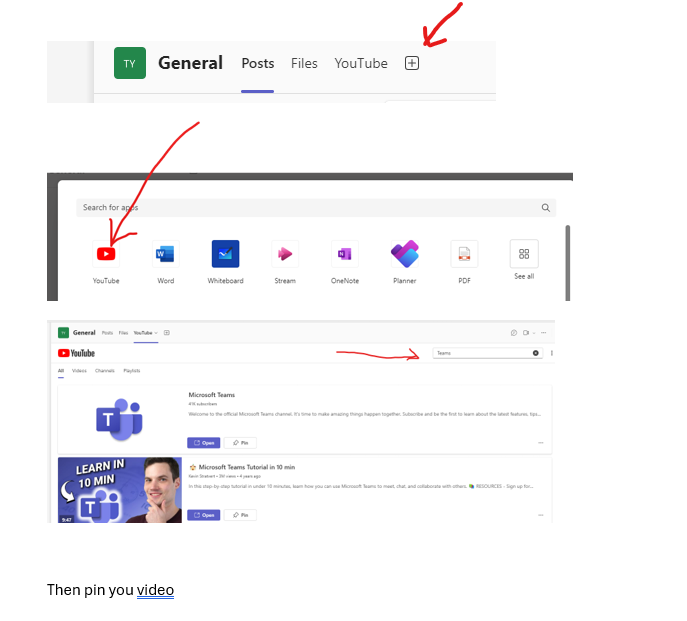
<span style="font-size: 10.0pt; mso-bidi-font-size: 12.0pt; font-family: 'Courier New'; mso-fareast-font-family: 'Courier New'; color: black; mso-font-kerning: 0pt; mso-ligatures: none;"><span style="mso-list: Ignore;">o<span style="font: 7.0pt 'Times New Roman';"> </span></span></span><span style="mso-ascii-font-family: Aptos; mso-fareast-font-family: 'Times New Roman'; mso-hansi-font-family: Aptos; mso-bidi-font-family: 'Segoe UI'; color: black; mso-font-kerning: 0pt; mso-ligatures: none;">You can easily embed YouTube videos within a **Teams tab** by creating a new tab and selecting "Website." Simply paste the video link, and students will be able to watch the video directly in Teams without needing to leave the platform or sign in to YouTube.</span>

[![image.png](https://docs.stgrsd.org/uploads/images/gallery/2024-09/scaled-1680-/y40image.png)](https://docs.stgrsd.org/uploads/images/gallery/2024-09/y40image.png)

<span style="mso-ascii-font-family: Aptos; mso-fareast-font-family: 'Times New Roman'; mso-hansi-font-family: Aptos; mso-bidi-font-family: 'Segoe UI'; color: black; mso-font-kerning: 0pt; mso-ligatures: none;">Once you have pinned the video this will now show up to where your class can watch the videos you posted.</span>

<span style="mso-ascii-font-family: Aptos; mso-fareast-font-family: 'Times New Roman'; mso-hansi-font-family: Aptos; mso-bidi-font-family: 'Segoe UI'; color: black; mso-font-kerning: 0pt; mso-ligatures: none;"> </span>

<span style="mso-ascii-font-family: Aptos; mso-fareast-font-family: Aptos; mso-hansi-font-family: Aptos; mso-bidi-font-family: Aptos; color: black; mso-font-kerning: 0pt; mso-ligatures: none;"><span style="mso-list: Ignore;">2.<span style="font: 7.0pt 'Times New Roman';"> </span></span></span>**<span style="mso-ascii-font-family: Aptos; mso-fareast-font-family: 'Times New Roman'; mso-hansi-font-family: Aptos; mso-bidi-font-family: 'Segoe UI'; color: black; mso-font-kerning: 0pt; mso-ligatures: none;">Sharing YouTube Links in Assignments</span>**<span style="mso-ascii-font-family: Aptos; mso-fareast-font-family: 'Times New Roman'; mso-hansi-font-family: Aptos; mso-bidi-font-family: 'Segoe UI'; color: black; mso-font-kerning: 0pt; mso-ligatures: none;">:</span>

<span style="font-size: 10.0pt; mso-bidi-font-size: 12.0pt; font-family: 'Courier New'; mso-fareast-font-family: 'Courier New'; color: black; mso-font-kerning: 0pt; mso-ligatures: none;"><span style="mso-list: Ignore;">o<span style="font: 7.0pt 'Times New Roman';"> </span></span></span><span style="mso-ascii-font-family: Aptos; mso-fareast-font-family: 'Times New Roman'; mso-hansi-font-family: Aptos; mso-bidi-font-family: 'Segoe UI'; color: black; mso-font-kerning: 0pt; mso-ligatures: none;">When creating assignments, you can add YouTube video links directly as resources. Students can click the link and view the video without needing to sign in, as long as the video is not age-restricted.</span>

<span style="mso-ascii-font-family: Aptos; mso-fareast-font-family: 'Times New Roman'; mso-hansi-font-family: Aptos; mso-bidi-font-family: 'Segoe UI'; color: black; mso-font-kerning: 0pt; mso-ligatures: none;"> </span>

**<span style="mso-ascii-font-family: Aptos; mso-fareast-font-family: Aptos; mso-hansi-font-family: Aptos; mso-bidi-font-family: Aptos; color: black; mso-font-kerning: 0pt; mso-ligatures: none;"><span style="mso-list: Ignore;">3.<span style="font: 7.0pt 'Times New Roman';"> </span></span></span>****<span style="mso-ascii-font-family: Aptos; mso-fareast-font-family: 'Times New Roman'; mso-hansi-font-family: Aptos; mso-bidi-font-family: 'Segoe UI'; color: black; mso-font-kerning: 0pt; mso-ligatures: none;">Staying Inside Microsoft Ecosystem</span>**<span style="mso-ascii-font-family: Aptos; mso-fareast-font-family: 'Times New Roman'; mso-hansi-font-family: Aptos; mso-bidi-font-family: 'Segoe UI'; color: black; mso-font-kerning: 0pt; mso-ligatures: none;">:</span>

<span style="mso-ascii-font-family: Aptos; mso-fareast-font-family: Aptos; mso-hansi-font-family: Aptos; mso-bidi-font-family: Aptos; color: black; mso-font-kerning: 0pt; mso-ligatures: none;"><span style="mso-list: Ignore;">a.<span style="font: 7.0pt 'Times New Roman';"> </span></span></span><span style="mso-ascii-font-family: Aptos; mso-fareast-font-family: 'Times New Roman'; mso-hansi-font-family: Aptos; mso-bidi-font-family: 'Segoe UI'; color: black; mso-font-kerning: 0pt; mso-ligatures: none;">If you're concerned about distractions or external content, you can download the video (if allowed) and upload it to **Microsoft Stream**. This way, the video stays within the Microsoft 365 environment, and students can access it through Teams using their school credentials.</span>

**<span style="mso-ascii-font-family: Aptos; mso-fareast-font-family: 'Times New Roman'; mso-hansi-font-family: Aptos; mso-bidi-font-family: 'Segoe UI'; color: black; mso-font-kerning: 0pt; mso-ligatures: none;"> </span>**

**<span style="mso-ascii-font-family: Aptos; mso-fareast-font-family: 'Times New Roman'; mso-hansi-font-family: Aptos; mso-bidi-font-family: 'Segoe UI'; color: black; mso-font-kerning: 0pt; mso-ligatures: none;"> </span>**

**<span style="mso-ascii-font-family: Aptos; mso-fareast-font-family: 'Times New Roman'; mso-hansi-font-family: Aptos; mso-bidi-font-family: 'Segoe UI'; color: black; mso-font-kerning: 0pt; mso-ligatures: none;">Balancing Access and Parental Concerns</span>**

<span style="mso-ascii-font-family: Aptos; mso-fareast-font-family: 'Times New Roman'; mso-hansi-font-family: Aptos; mso-bidi-font-family: 'Segoe UI'; color: black; mso-font-kerning: 0pt; mso-ligatures: none;">While these methods allow us to provide valuable instructional material without requiring logins, we must remain aware of parent concerns about balanced YouTube access, which is not something you are doing. However, by embedding videos directly in Teams or using Microsoft Stream, we can give access to educational content we assign, minimizing exposure to non-educational material.</span>