# iPad Guides

# Mosyle Self Service


# Using Mosyle Self Service

#### **Self Service Portal**

If you would like to install any of the apps directly managed by Mosyle MDM, you can use the Mosyle Manager's Self Service Portal

1\. Open the Mosyle Manager app.  
 It has an icon that looks like this:

![](https://learn.oxnardsd.org/portals/0/mosyle2.png?ver=pBhu1fjDypDMRusUkQQbhg%3d%3d)

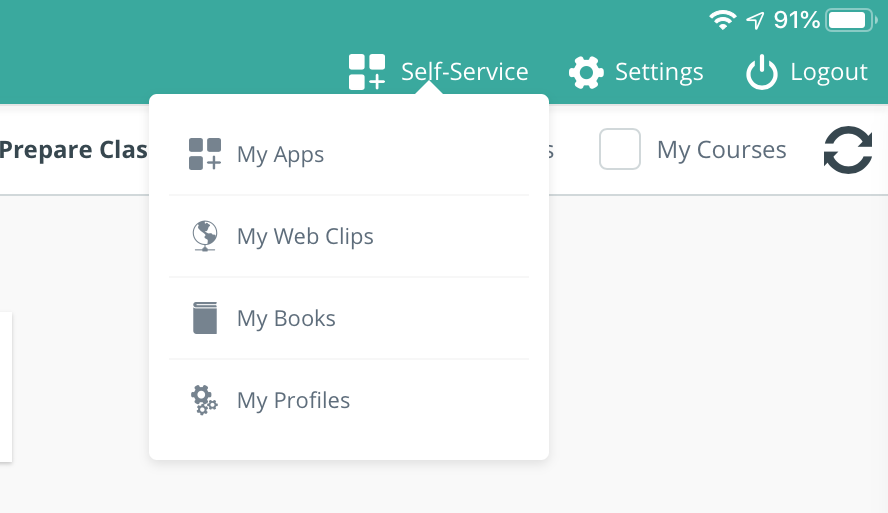
2\. Select the "Self-Service" button at the top of the app

![](https://learn.oxnardsd.org/portals/0/selfserv1.png)

3\. Select "My Apps"

![](https://learn.oxnardsd.org/portals/0/IMG_0002.PNG)

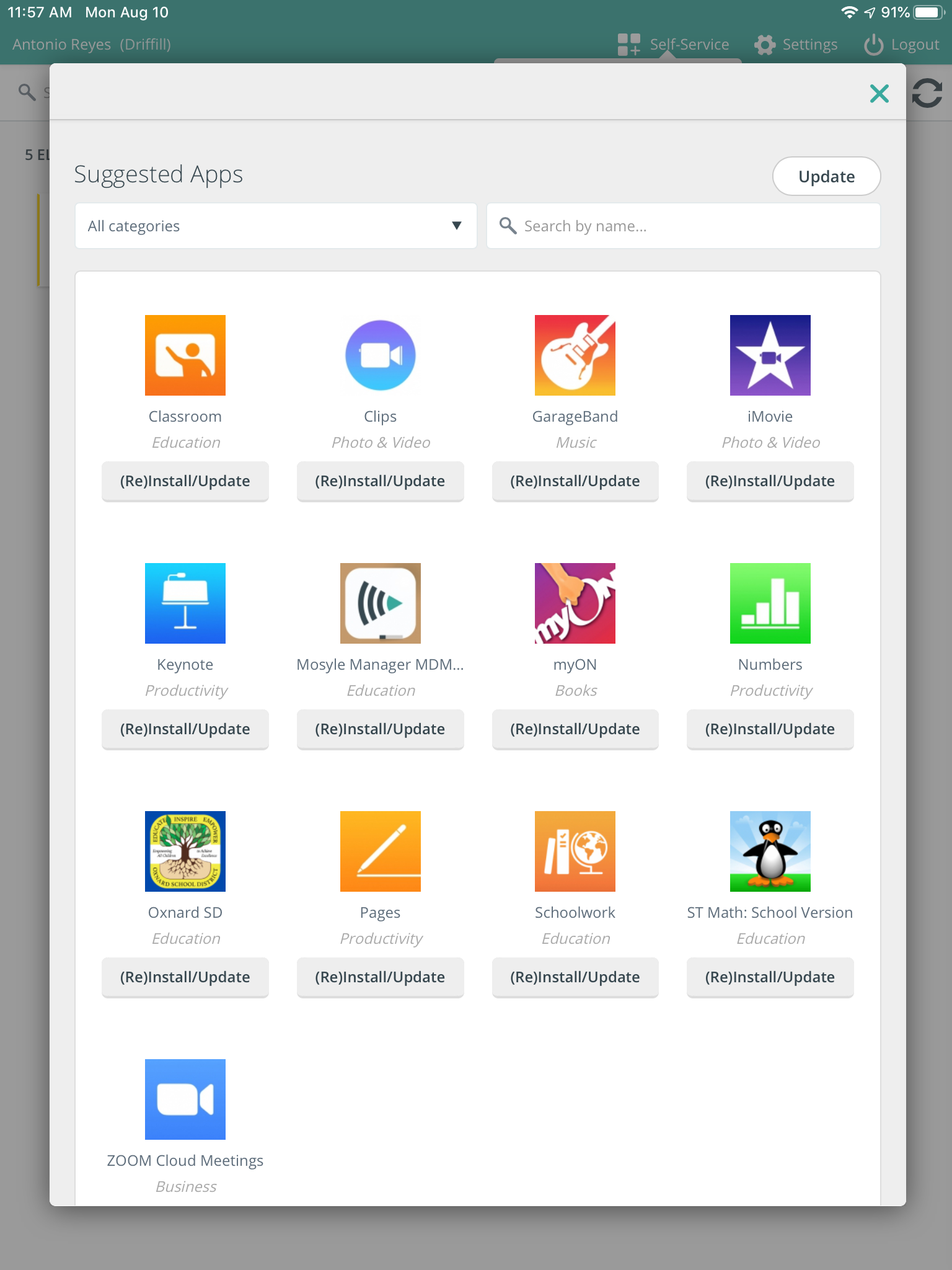
4\. Select the app you want to install and select "(Re)Install/Upadate".
![](https://learn.oxnardsd.org/portals/0/IMG_0003.PNG)

The app will then be queued to be installed on your iPad.

# Requesting/Purchasing Apps


# Downloading Free Apps

If you'd like a free app for classroom use on your iPad, please submit a help ticket at: [https://www.stgrsd.org/helpdesk](https://www.stgrsd.org/helpdesk)

There's a couple things that our district needs to keep in mind in regards to the apps and other software that we put on our district devices. Most importantly we need to find out if the apps we put on the iPads collect any data or what data they collect if they do. If they do collect data, we need to make sure that is applies to COPPA compliance standards in order to protect student data.

# Purchasing for SPED iPads

<span class="TextRun SCXW78878832 BCX8" data-contrast="none" lang="EN-US" xml:lang="EN-US"><span class="NormalTextRun SCXW78878832 BCX8">The s</span><span class="NormalTextRun SCXW78878832 BCX8">implest </span><span class="NormalTextRun SCXW78878832 BCX8">way to add money for Apple School Manager </span><span class="NormalTextRun SCXW78878832 BCX8">is </span><span class="NormalTextRun SCXW78878832 BCX8">t</span><span class="NormalTextRun SCXW78878832 BCX8">o </span><span class="NormalTextRun SCXW78878832 BCX8">g</span><span class="NormalTextRun SCXW78878832 BCX8">o </span><span class="NormalTextRun SCXW78878832 BCX8">to </span><span class="NormalTextRun SCXW78878832 BCX8">our custom Apple Store and purchase VPP credits</span><span class="NormalTextRun SCXW78878832 BCX8">. This is the link to find our custom apple store: </span></span>[<span class="TextRun Underlined SCXW78878832 BCX8" data-contrast="none" lang="EN-US" xml:lang="EN-US"><span class="NormalTextRun SCXW78878832 BCX8" data-ccp-charstyle="Hyperlink">Apple Store for Education Institution : Find Your School</span></span>](https://ecommerce.apple.com/asb2bstorefront/fys?language=EN&country=us)<span class="EOP SCXW78878832 BCX8" data-ccp-props="{"201341983":0,"335559739":0,"335559740":240}"> </span>

<span class="TextRun SCXW78878832 BCX8" data-contrast="none" lang="EN-US" xml:lang="EN-US"><span class="NormalTextRun SCXW78878832 BCX8">We would then log in with one of our school Apple IDs (</span></span>[<span class="TextRun Underlined SCXW78878832 BCX8" data-contrast="none" lang="EN-US" xml:lang="EN-US"><span class="NormalTextRun SCXW78878832 BCX8" data-ccp-charstyle="Hyperlink">appletech@stgrsd.org</span></span>](mailto:appletech@stgrsd.org)<span class="TextRun SCXW78878832 BCX8" data-contrast="auto" lang="EN-US" xml:lang="EN-US"><span class="NormalTextRun SCXW78878832 BCX8"> is what we use for Special Education funds).</span><span class="NormalTextRun SCXW78878832 BCX8"> </span></span><span class="EOP SCXW78878832 BCX8" data-ccp-props="{"201341983":0,"335559739":0,"335559740":240}"> </span>

<span class="TextRun SCXW78878832 BCX8" data-contrast="auto" lang="EN-US" xml:lang="EN-US"><span class="NormalTextRun SCXW78878832 BCX8">They take purchase orders and credit cards. </span></span><span class="EOP SCXW78878832 BCX8" data-ccp-props="{"201341983":0,"335559739":0,"335559740":240}"> </span>

<span class="TextRun SCXW78878832 BCX8" data-contrast="auto" lang="EN-US" xml:lang="EN-US"><span class="NormalTextRun SCXW78878832 BCX8">Use redemption codes to </span><span class="NormalTextRun SCXW78878832 BCX8">purchase</span><span class="NormalTextRun SCXW78878832 BCX8"> Apps from Apple School Manager. Here how this process works: </span></span>[<span class="TextRun Underlined SCXW78878832 BCX8" data-contrast="none" lang="EN-US" xml:lang="EN-US"><span class="NormalTextRun SCXW78878832 BCX8" data-ccp-charstyle="Hyperlink">Get Volume Purchase Program (VPP) Credit securely from Apple - Apple Support.</span></span>](https://support.apple.com/en-us/102073)

<span class="EOP SCXW78878832 BCX8" data-ccp-props="{"201341983":0,"335559739":160,"335559740":259}"></span>

# Purchasing for General Ed iPads

<span class="TextRun SCXW78878832 BCX8" data-contrast="none" lang="EN-US" xml:lang="EN-US"><span class="NormalTextRun SCXW78878832 BCX8">The s</span><span class="NormalTextRun SCXW78878832 BCX8">implest </span><span class="NormalTextRun SCXW78878832 BCX8">way to add money for Apple School Manager </span><span class="NormalTextRun SCXW78878832 BCX8">is </span><span class="NormalTextRun SCXW78878832 BCX8">t</span><span class="NormalTextRun SCXW78878832 BCX8">o </span><span class="NormalTextRun SCXW78878832 BCX8">g</span><span class="NormalTextRun SCXW78878832 BCX8">o </span><span class="NormalTextRun SCXW78878832 BCX8">to </span><span class="NormalTextRun SCXW78878832 BCX8">our custom Apple Store and purchase VPP credits</span><span class="NormalTextRun SCXW78878832 BCX8">. This is the link to find our custom apple store: </span></span>[<span class="TextRun Underlined SCXW78878832 BCX8" data-contrast="none" lang="EN-US" xml:lang="EN-US"><span class="NormalTextRun SCXW78878832 BCX8" data-ccp-charstyle="Hyperlink">Apple Store for Education Institution : Find Your School</span></span>](https://ecommerce.apple.com/asb2bstorefront/fys?language=EN&country=us)<span class="EOP SCXW78878832 BCX8" data-ccp-props="{"201341983":0,"335559739":0,"335559740":240}"> </span>

<span class="TextRun SCXW78878832 BCX8" data-contrast="none" lang="EN-US" xml:lang="EN-US"><span class="NormalTextRun SCXW78878832 BCX8">Then log in with one of our school Apple IDs (</span></span><span class="TextRun SCXW78878832 BCX8" data-contrast="auto" lang="EN-US" xml:lang="EN-US"><span class="NormalTextRun SCXW78878832 BCX8"><stgrsdipads@appleid.stgrsd.org> is what we use for General Education funds).</span><span class="NormalTextRun SCXW78878832 BCX8"> </span></span><span class="EOP SCXW78878832 BCX8" data-ccp-props="{"201341983":0,"335559739":0,"335559740":240}"> </span>

<span class="TextRun SCXW78878832 BCX8" data-contrast="auto" lang="EN-US" xml:lang="EN-US"><span class="NormalTextRun SCXW78878832 BCX8">They take purchase orders and credit cards. </span></span><span class="EOP SCXW78878832 BCX8" data-ccp-props="{"201341983":0,"335559739":0,"335559740":240}"> </span>

<span class="TextRun SCXW78878832 BCX8" data-contrast="auto" lang="EN-US" xml:lang="EN-US"><span class="NormalTextRun SCXW78878832 BCX8">Use redemption codes to </span><span class="NormalTextRun SCXW78878832 BCX8">purchase</span><span class="NormalTextRun SCXW78878832 BCX8"> Apps from Apple School Manager. Here how this process works: </span></span>[<span class="TextRun Underlined SCXW78878832 BCX8" data-contrast="none" lang="EN-US" xml:lang="EN-US"><span class="NormalTextRun SCXW78878832 BCX8" data-ccp-charstyle="Hyperlink">Get Volume Purchase Program (VPP) Credit securely from Apple - Apple Support.</span></span>](https://support.apple.com/en-us/102073)

<span class="EOP SCXW78878832 BCX8" data-ccp-props="{"201341983":0,"335559739":160,"335559740":259}"></span>